前回に引き続き、Bitcurator NLPのセットアップからです。
前回スタックした、セットアップ。。。
今回、お師匠が問題解決虎の巻を整えていただきました。ので、それを書いていきます。
前回終了後・・・
「道場」後に有志のかたがたが作業を進めました。そのなかで、Hさんから提案があり、無事に解決した点を記します。
$ git clone https://github.com/bitcurator/bitcurator-nlp-gentm
を行った後、
/home/bitcurator-nlp-gentm/にある"setup.sh"を開き、232行と233行の間に、
git init
を挿入したのち、改めてセットアップを実行します。
$ cd bitcurator-nlp-gentm
$ sudo ./setup.sh
これで、"sleuthkit"のエラーが解消されます。
再度、セットアップ作業と対峙
問題は、pythonとpython3の関係にありました。
そこで、インストール失敗したPCで下記のコマンドを実行します。
まずは、pythonとpython3のファイル属性を確認します。
$ ll /usr/bin/pytho*
すると、下記のよう表示されます。

例えば、
$ ........~~~~/usr/bin/python->python2.7
は、python2.7のファイルであり
$ ........~~~~/usr/bin/python2->python2.7
もまた、同様で、さらに
$ ........~~~~/usr/bin/python3->python3.6
と、"3"には、3.6が対応しており、単に"python"のみを実行すると、"2.7"が選択されることがわかります。
そこで、
python(2)関連を削除し、リンクを2から3にかえてあげることにします。
$ cd /usr/bin/
$ sudo rm python
$ sudo rm python-config
$ sudo ln -s python3.6 python
$ sudo ln -s python3.6-config python-config
そして、pythonのバージョンを確認すると
$ python -V
$ python 3.6.9
と、python2.7から"3.6.9"がデフォルトに変更されたことが確認できました。
つぎに、bitcurator-nlp-gentmにディレクトリを変更します。
$ cd bitcurator-nlp-gentm
そして、ツールを実行します。
$ python bcnlp_tm.py
すぐに、エラーメッセージが出ます!!メッセージにあるエラーのうち、最終行にあるメッセージに記された内容を確認し、それぞれ対処します。
※今回試した際に出たエラーです。
まず、python2から3に自動でコード変換させます。"2to3"をインストールし、実行します。
$ sudo apt install 2to3 -y
エラーが出たファイルを確認し、"2to3"を実行してpython3のコードに変換します。
・bcnlp_tm.py
$ 2to3 -w bcnlp_tm.py
・bcnlp_fxtract.py
$ 2to3 -w bcnlp_fxtract.py
・bn_filextract.py
$ 2to3 -w bn_filextract.py
・bn_filextract.pyの656行目を修正更新
sudo vi bn_filextract.py
if " " in f.info.name.name.decode():
name_slug = f.info.name.name.replace(b" ", b"%20")
・bn_filextract.pyの183行目をコメントアウト
##doc = str(doc, erros='ignore')
・bn_filextract.pyを修正更新
fs_desc = "Unknow file system"
※インデントを上段の"fs_desc"に合わせること!
Bitcurator-NLPを確認!
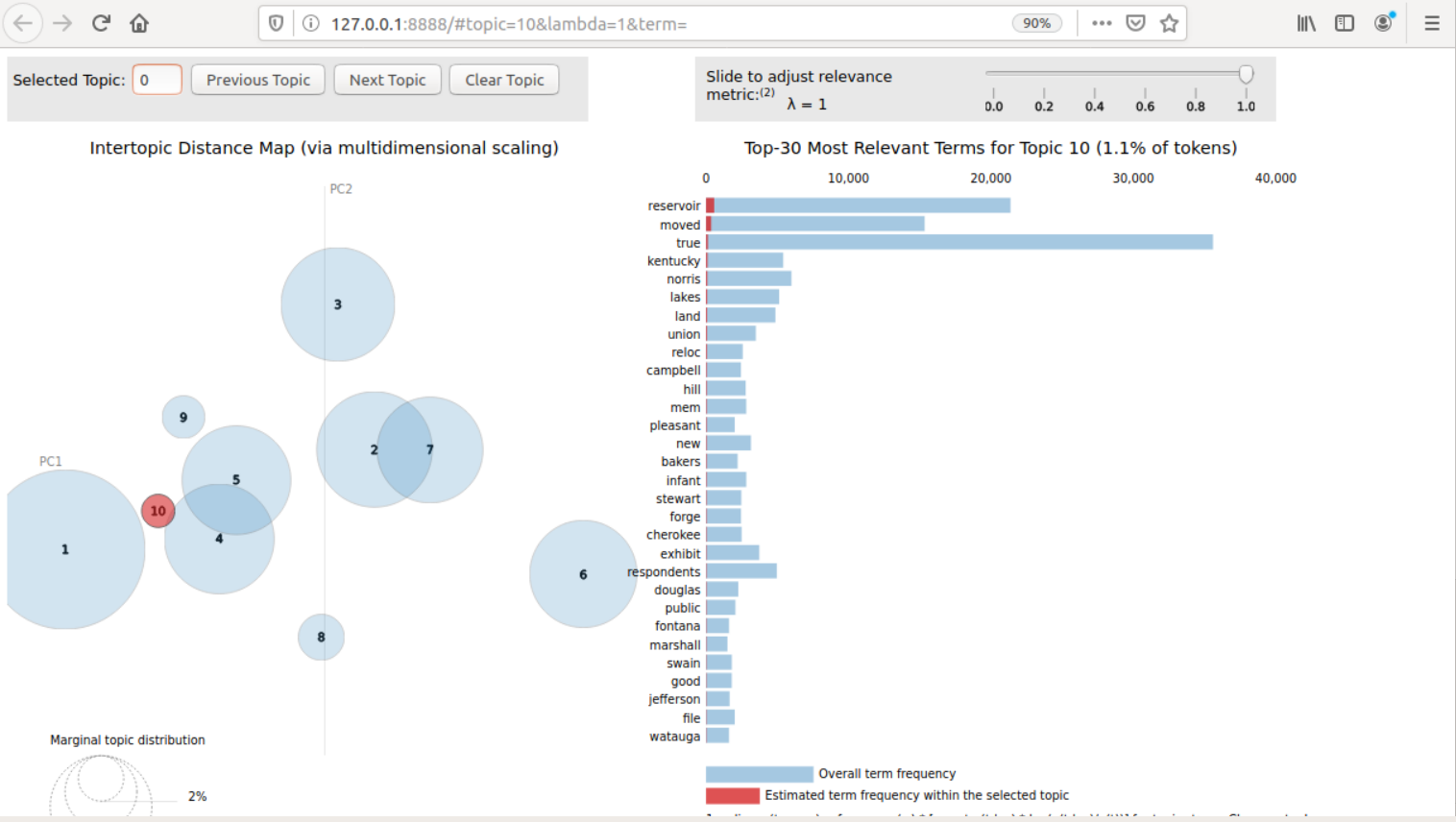
エラー箇所がなくなると走り出します。少々時間がかかりますが、うまくいくとWebブラウザー"firefox"が起動し、下記の画面が表示されます。
ここでは、NLPに同梱しているサンプルを使い、検証しました。
が!!!
これがなにを示しているのか?どう活かしていいのかがわからず、議論となります。
あ~でもない、こ~でもない、といいつつ、関連論文を見たりした結果、
●左側の各円に付された数字はトピックの割合の大きい順に付されている。
●右側のグラフは、トピックに属する具体的なワードを表示している。
●トピックが作成されるジャンル?属性?については、今回はわからず。
ということで、
この件については、改めて論文を読んで次回議論することになりました。
以下を読んできましょう!答え合わせするよ!!
https://core.ac.uk/download/pdf/210610153.pdf
https://saaers.wordpress.com/2019/07/02/an-exploration-of-bitcurator-nlp-incorporating-new-tools-for-born-digital-collections/
関連確認
ディスクイメージの分析結果の根拠となるデータはどこに格納されているのか?ということでそれを確認しました。
/home/bitcurator-nlp-gentm/extracted_files/0/
で確認できました!
そして、先ほどの議論のなかで、われわれが把握できるディスクイメージを使ってみてはどうかということになり、以前、"Bitcurator"で作成したイメージファイルで試用することに。それを思い出したWさんエラいわ!!
早速、"config.txt"を修正します。
$ sudo vi config.txt
7行目にある"govdocs45sampler.E01"を試用するファイル名に置換。
そして忘れては絶対いけない作業、
/home/bitcurator-nlp-gentm/extracted_files/を空にしてください!!この作業を忘れると"govdocs45sampler.E01"の結果と混ざります。。。
結果は、日本語はやはり厳しいようです。
ということで、今日は以上!
記載漏れがあるだろうな・・・ご指摘ください。
次回は、7月3日です!!
論文読むの忘れるなよーヨーヨーオー。。。
そして、最後にこれだけ、Natural Language Processingって私の脳力では理解できないのでは?